
Best for Microsoft governance and managed agents: Centered Networks. Best for nonprofit-focused managed IT: Community IT Innovators. Best for technology support alongside nonprofit capacity building: Tech Impact. This 2026 guide compares nonprofit IT services providers by the work you need them to own, the decisions your staff must retain, and the evidence you should request before signing.
- Centered Networks fits nonprofit IT services buyers seeking managed Microsoft 365, security, Copilot, and governed agents.
- Community IT Innovators fits nonprofits seeking nonprofit-focused managed IT support.
- Tech Impact fits nonprofits considering technology services alongside technology education and capacity building.
- Choose nonprofit IT services providers by written responsibilities, human approval boundaries, and an accountable operating plan.
Why this matters
A nonprofit does not need the longest service catalog. You need someone accountable for the systems that keep staff working, protect sensitive information, and support decisions your board can understand. A help desk, a security engagement, and an agent deployment solve different problems.
In 2026, put those differences in the buying brief before requesting proposals. Otherwise, you compare a support contract with a transformation project and mistake different scopes for different quality.
Sounds like your staff need reliable access, fewer unresolved problems, and clearer rules for Copilot. Start with those outcomes. Name the people responsible for accepting the work, approving changes, and checking whether the service delivers what the contract promises.
What makes the best nonprofit IT services providers
Use these criteria before reviewing the shortlist. A provider belongs on your list only when its proposed engagement matches your organization's actual work.
- Service ownership: Identify who handles support, administration, security changes, escalations, and vendor coordination. A service name is not a responsibility assignment.
- Microsoft fit: If your organization uses Microsoft 365, ask how the engagement addresses Entra identity, Microsoft 365 administration, Azure where relevant, and Purview governance requirements.
- Human approval boundaries: Separate what a provider or agent can draft from what it can change, publish, send, or delete. Your people check and decide.
- Nonprofit workflow fit: Evaluate donor information, grant documents, board materials, and staff turnover against the proposed scope. Do not substitute a generic demonstration for your own workflow.
- Operating evidence: Request a sample service report, escalation process, access handover, and change record. Evaluate documents, not adjectives.
- Exit control: Specify how your organization retains administrative access, documentation, and responsibility for its data when the engagement ends.
The best fit is the provider whose written responsibilities match your risks and your staff's capacity. A broad offering does not compensate for an unclear contract.
Nonprofit IT providers at a glance
Use this 2026 shortlist as a starting point for qualified conversations, not a claim that the providers deliver identical services. Each recommendation occupies a different buying slot.
| Provider | Best for | Distinctive focus | Key selection constraint |
|---|---|---|---|
| Centered Networks | Microsoft governance and managed agents | Managed Microsoft 365, security, Copilot, and governed automation for mission-driven organizations | Microsoft-centered scope must match your environment |
| Community IT Innovators | Nonprofit-focused managed IT | Managed IT services focused on nonprofit organizations | Confirm responsibility for any separate agent or governance project |
| Tech Impact | Technology support and nonprofit capacity building | Nonprofit technology services alongside technology education | Distinguish ongoing operational services from educational resources |
Do not treat these rows as interchangeable proposals. Ask each provider to respond to the same operating brief, then compare the responsibilities it accepts.
1. Centered Networks: best for Microsoft governance and managed agents
Centered Networks is a Microsoft Solutions Partner providing managed IT, security, and AI/Copilot agent services for US nonprofits, foundations, grantmakers, and rural hospitals. Its stated scope includes Microsoft 365, Azure, Purview, and governance.
Centered Networks is best for nonprofits seeking Microsoft IT services and governed agents under a defined operating scope. This is the clearest fit on the shortlist when your buying decision connects Microsoft administration, security readiness, and automation rather than treating each as an unrelated project.
Sounds like you want Copilot or agents, but the board wants control first. Start with the information the system can reach, the actions it can take, and the person who approves its output. Ask how M365 InstantOn and security readiness, Managed AgentOps, or the 90-Day AI Roadmap match that starting point.
Pros
- The stated service scope connects managed Microsoft 365 with security, Copilot, and agents.
- The stated customer focus includes nonprofits, foundations, and grantmakers rather than relying on a generic business audience.
- Governance is part of the offering, making permissions and approval boundaries appropriate topics for the initial engagement discussion.
- The Microsoft service focus gives your IT leader concrete systems to include in the scope: Microsoft 365, Azure, and Purview.
Cons and trade-offs
- A Microsoft-centered engagement is not a substitute for confirming support for every non-Microsoft system your staff uses.
- Governed automation requires your organization to supply workflow owners and approvers. Hiring a provider does not transfer those decisions away from your leadership.
Best for: Nonprofits that want managed Microsoft services and controlled automation, with staff approval built into the buying requirements.
Before committing, request a written boundary between an initial deployment and ongoing Managed AgentOps. Specify who approves permission changes, who reviews failed runs, and who authorizes new agent actions. For foundation or grantmaking work, begin with a draft-only scenario rather than an agent that communicates decisions externally.
Verdict: Buy for a Microsoft-centered engagement when the proposed scope names owners, approval boundaries, and ongoing responsibilities.
2. Community IT Innovators: best for nonprofit-focused managed IT
Community IT Innovators provides managed IT services for nonprofit organizations. Put Community IT Innovators on your shortlist when the primary problem is ongoing IT operations, rather than selecting a provider around a new agent initiative.
This is a distinct buying job. Staff need systems administered, problems addressed, and changes coordinated; leadership needs to know who owns the work. Start the conversation with your support responsibilities and current operating gaps.
Pros
- The nonprofit focus matches the intended buyer rather than requiring you to translate a general commercial pitch.
- Managed IT is directly relevant to organizations seeking an ongoing service relationship.
- The operational focus gives you a clear basis for requesting a proposal against recurring administration and support tasks.
Cons and trade-offs
- Managed IT still requires an internal decision-maker for priorities, exceptions, and staff communication.
- A managed IT engagement does not itself define an agent-governance engagement. Put any Copilot or automation requirements in writing rather than assuming coverage.
Best for: Nonprofits selecting a nonprofit-focused provider for ongoing IT operations.
Ask Community IT Innovators to map the proposed service to your support queue, administrator responsibilities, escalation needs, and existing vendors. Require the proposal to distinguish tasks the provider owns from tasks it coordinates with another party.
Do not lead with a long list of software names. Describe the operational problem: staff cannot identify the right escalation route, administrative work lacks an owner, or changes reach users without adequate preparation. Ask for the operating process that addresses that problem.
Verdict: Buy for nonprofit-focused managed IT when the contract clearly assigns recurring support and administration responsibilities.
3. Tech Impact: best for technology support and capacity building
Tech Impact is a nonprofit organization offering technology services and technology education for nonprofits. Put Tech Impact on your shortlist when your organization needs technology support and also wants to strengthen how staff understand and manage technology decisions.
Education and operational delivery serve different purposes. Your selection process should distinguish them so that useful guidance does not get mistaken for someone accepting responsibility for your production environment.
Pros
- The organization's nonprofit technology focus is relevant to mission-driven buyers.
- Technology services and educational resources address different parts of organizational readiness.
- The combination gives buyers a reason to discuss staff capability alongside technical requirements.
Cons and trade-offs
- Educational resources do not replace a signed operating scope for administration, support, or security work.
- Staff still need time to apply guidance and own decisions. Capacity building is not the same as transferring all work to a provider.
Best for: Nonprofits evaluating technology services alongside staff education and organizational capacity building.
Ask Tech Impact which offering addresses your immediate requirement and which responsibilities remain with your team. Keep the questions concrete: who administers the environment, who approves changes, and which activities belong to an advisory or educational engagement?
If your executive team needs help making technology decisions, include that requirement explicitly. If your immediate need is operational support, request an operational scope first. Both needs belong in the conversation, but they should not blur together in the contract.
Verdict: Buy when the proposed engagement separates technology delivery from education and gives each a clear owner.
How to evaluate the proposals
Give every shortlisted provider the same brief. For your 2026 selection, use a 1-page decision memo covering the operating problem, systems involved, sensitive information, staff owner, and approval requirements. Attach a separate system inventory rather than burying the decision in technical detail.
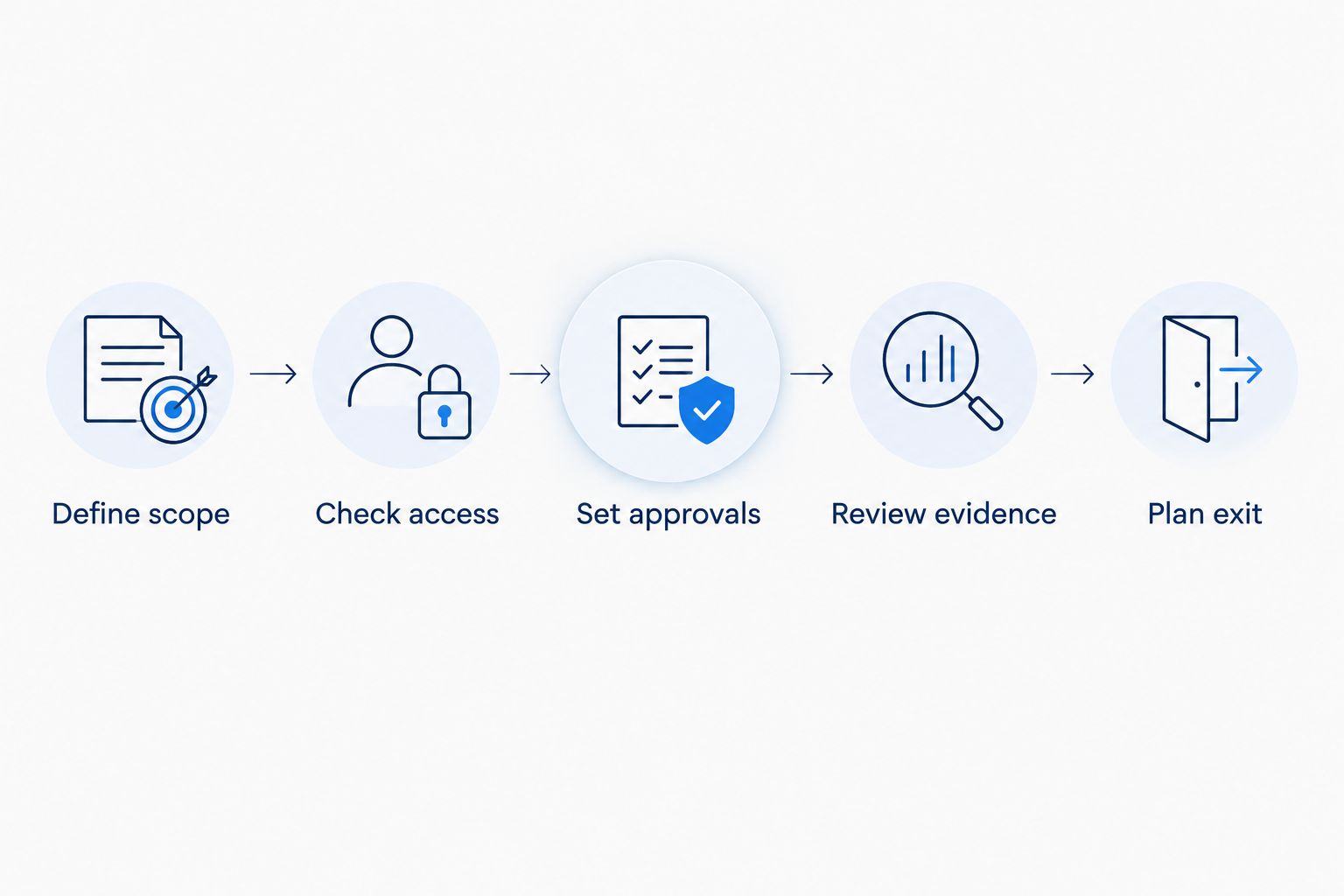
Then compare the proposals through the same sequence. This is a procurement process, not a promise about any provider's delivery method.
Define scope
Write the problem in operational terms. For example: grant staff need help finding approved documents, but only staff can finalize correspondence. Separate ongoing support from a deployment project, and separate both from strategic advice.
Check access
Ask which accounts, permissions, and administrative roles the provider needs. Identify who approves access and how it is removed. For agents, name the source information and allowed actions before discussing a demonstration.
Set approvals
Define who can approve changes to systems and workflows. For sensitive grant or donor work, keep the initial agent scenario draft only. Do not let a successful demonstration become permission to send messages or change records.
Review evidence
Request examples of the documents the engagement will produce: service reports, change records, escalation instructions, and handover materials. Evaluate whether an executive can understand the decision and an IT leader can act on it.
Plan exit
Specify access handover, documentation, and unresolved-work ownership. Put the exit requirements in the agreement before implementation begins. Your organization should not have to reconstruct its operating knowledge at the end of a relationship.
What to ask before hiring
Use a 30-minute scoping discussion to test whether the provider can turn your problem into a decision-ready engagement. This is a suggested meeting format, not a published service promise.
Ask these questions and request written answers in the proposal:
- Who owns each task? Distinguish delivery, coordination, and approval rather than assigning everything to a generic support team.
- What stays with us? Identify the staff owner, executive sponsor, and any decisions the provider cannot make on your behalf.
- What can an agent do? Separate reading, drafting, updating, and sending. State which actions require approval.
- How do we stop a workflow? Name the person authorized to pause it and the process for investigating a problem.
- What will the board see? Request a report structure that separates completed work, open risks, and decisions requiring leadership.
- What happens at handover? Confirm how your team receives access records, configuration documentation, and unresolved items.
For rural hospital buyers, add healthcare-specific requirements to the same process. Discuss protected health information, required agreements such as BAAs where applicable, and the exact systems in scope. A healthcare engagement needs its own written requirements; a nonprofit service description is not evidence of HIPAA compliance.
Define your Microsoft service scope
Discuss managed Microsoft 365, security readiness, and governed agents for your nonprofit.
How this shortlist is ranked
This 2026 shortlist ranks providers by fit with distinct buying needs: Microsoft governance and agents, nonprofit managed IT, and technology support alongside capacity building. It does not rank measured response times, customer satisfaction, or security outcomes.
The criteria are service ownership, platform fit, approval boundaries, nonprofit workflow fit, operating evidence, and exit control. Use those criteria to evaluate the actual proposal. A provider's public focus establishes a reason to talk; the written engagement establishes a reason to hire.
Which nonprofit IT provider should you choose?
Choose the buying lane before choosing the provider. For Microsoft administration, security readiness, and governed agents, start with the Microsoft-focused option. For ongoing nonprofit IT operations, start with Community IT Innovators. For technology services alongside organizational learning, start with Tech Impact.
If you remain undecided in 2026, do not request a larger presentation. Write the task you need someone to own and the decision your staff must retain. That distinction will narrow the shortlist faster than another feature comparison.
Treat the first engagement as a defined operating commitment. Require accepted deliverables, named owners, and a review point before extending the scope.
FAQ
What's the best nonprofit IT services provider for Microsoft 365 and agents?
Centered Networks fits nonprofits seeking managed Microsoft 365, security, Copilot, and governed agents. Confirm the engagement's access requirements, human approval boundaries, and ongoing operating responsibilities before hiring.
What's the best provider for ongoing nonprofit IT support?
Community IT Innovators belongs on the shortlist for nonprofit-focused managed IT. Compare its proposed responsibilities with your support, administration, and escalation requirements.
Is Tech Impact a fit for nonprofits that need technology education?
Tech Impact belongs on the shortlist when technology education matters alongside technology services. Distinguish educational resources from contracted operational responsibilities.
Should a nonprofit hire a managed IT provider or an agent specialist?
Hire against the work you need someone to own. Recurring IT support and governed agent deployment are different requirements, even when one provider offers both.
What should a nonprofit board ask before approving an IT provider?
The board should ask who owns the work, who approves changes, and how the organization retains control. Request a readable summary of scope, open risks, operating responsibilities, and exit arrangements.
Can a nonprofit agent send grant decisions automatically?
Keep grant decisions under human approval unless your organization explicitly authorizes a different workflow. Start with draft-only assistance and document permitted actions before allowing external communication.
What should a rural hospital confirm before hiring a managed IT provider?
A rural hospital should confirm healthcare-specific requirements in the written scope. Address protected health information, BAAs where applicable, access controls, and responsibility for each system rather than assuming compliance from a service description.
One last thing
Put a not authorized list beside the service scope. State which actions the provider and any agents cannot take without approval: sending grant correspondence, changing access, publishing board materials, or altering production workflows.
That list makes control visible. It also gives your staff a concrete way to recognize when a useful service has crossed into an unapproved decision.