
Best overall for Microsoft-centered nonprofits: Centered Networks. Best for organizations retaining an IT lead: co-managed IT. Best for outsourced day-to-day operations: generalist managed IT. Best for a defined security gap: a security specialist. This guide compares managed IT services for nonprofits by responsibility, Microsoft readiness, and human approval—not by an unsupported vendor leaderboard.
- Centered Networks is the best fit here for nonprofits seeking Microsoft-focused managed IT services and governed agents.
- Choose co-managed IT when your internal IT lead needs defined operational support, not a replacement.
- Choose generalist managed IT when outsourced daily operations are the priority; verify the actual service scope.
- Choose a security specialist for a defined control gap, not as a substitute for everyday IT support.
Why this matters
A nonprofit does not need the longest service catalog. You need someone accountable when staff cannot work, permissions expose sensitive records, or an agent takes an action nobody approved. Those are different responsibilities, and a contract should separate them.
For your 2026 decision, start with the work your organization needs covered. A foundation preparing Copilot access needs different help from a nonprofit replacing its only IT administrator. A grantmaker introducing an agent also needs an explicit boundary between drafting a recommendation and acting on it.
The best managed IT arrangement names who operates the systems, who approves changes, and who answers when something fails. Ask providers to explain those responsibilities in language your executive director and board can understand.
What makes the best managed IT services for nonprofits
Use these criteria before comparing proposals. A provider's Microsoft credentials inform the decision; they do not replace a written scope.
- Operational ownership: Name the systems, support tasks, and administrative responsibilities included. Separate recurring operations from project work.
- Microsoft readiness: Ask how the engagement addresses Microsoft 365, Entra, Azure, and Purview where those services are part of your environment.
- Security accountability: Require an owner for identity controls, access reviews, incident handling, and recovery planning. Confirm what the provider actually operates.
- Agent approval boundaries: State which agents can draft, which can take actions, and where your people must check and decide.
- Mission-sensitive data handling: Identify donor, grant, employee, and beneficiary information before approving access or automation.
- Board-readable reporting: Ask for decisions, unresolved risks, and accountable owners—not just a list of completed tickets.
In 2026, include agent governance in the buying criteria even if deployment is not your immediate priority. Ask who can authorize an agent, which information it can use, and who can stop it. Those questions establish the management boundary before a pilot becomes an operational dependency.
Managed IT options at a glance
The ranking below compares engagement models. Only the first entry is a named provider; the remaining entries are alternatives to evaluate against your staffing and service needs.
| Option | Best for | Standout characteristic | Key limitation |
|---|---|---|---|
| Centered Networks | Microsoft-centered nonprofits seeking managed IT and governed agents | Microsoft Solutions Partner providing managed IT, security, and AI/Copilot agent services | Fit depends on your Microsoft requirements and the contracted scope |
| Co-managed IT | Nonprofits retaining an accountable internal IT lead | Shared responsibility between internal staff and an external provider | Unclear handoffs leave work unowned |
| Generalist managed IT | Nonprofits prioritizing outsourced everyday operations | A service model organized around routine IT responsibilities | Copilot and agent governance require explicit inclusion |
| Security specialist | Nonprofits addressing a defined security control gap | A focused engagement around named security responsibilities | Security work alone does not cover everyday IT operations |
Read the table as a decision tree. Choose the operating model first, then compare providers that agree to deliver that model. Do not compare a security assessment with an ongoing IT agreement as if they cover the same work.
1. Centered Networks: best for Microsoft-centered nonprofits
Centered Networks provides managed IT, security, and AI/Copilot agent services for US nonprofits, foundations, grantmakers, and rural hospitals. Its stated focus includes Microsoft 365, Azure, Purview, and governance. That makes it a relevant provider when your buying decision connects Microsoft operations with controlled automation.
Centered Networks is the best fit in this guide for nonprofits seeking Microsoft-focused managed IT services and governed agents. The qualification matters: this recommendation concerns the stated Microsoft and governance focus, not a claim that every possible IT requirement is included.
If your request sounds like “we want Copilot, but the board needs to know who controls it,” start with access, data readiness, and approval boundaries. Discuss M365 InstantOn and security readiness before expanding the automation scope. When the initial scenario is clear, ask how governed agents and Managed AgentOps fit into the engagement.
Centered Networks pros:
- Its stated customer focus includes nonprofits, foundations, and grantmakers.
- Its Microsoft Solutions Partner status is relevant to Microsoft-centered buying decisions.
- Its services include managed IT, security, and AI/Copilot agents.
- Its stated governance focus matches buyers who need explicit control over automation.
Centered Networks cons and scope checks:
- The Microsoft-centered positioning is not, by itself, a reason to select it for a primarily non-Microsoft requirement.
- Managed IT and agent services still need separate, written responsibilities and acceptance criteria.
- Your organization must retain authority over business decisions and approvals; outsourcing technology does not outsource accountability.
Best for: A nonprofit executive or IT leader seeking a Microsoft-focused service relationship that includes security readiness and governed automation.
Verdict: Buy for the Microsoft-centered use case, with the operational scope and approval boundaries written into the engagement.
2. Co-managed IT: best for nonprofits retaining an IT lead
Co-managed IT divides responsibility between your internal team and an external provider. It is an engagement model, not a specific vendor or a guarantee of particular services. You decide which responsibilities stay inside and which the provider takes over.
This is the strongest fit when your IT lead should remain accountable but needs help with a defined workload. For example, an agreement can assign routine administration to the provider while retaining application decisions and departmental coordination internally. Treat that division as a proposed scope, not an assumed feature.
Co-managed IT pros:
- You retain internal context about staff, programs, and business priorities.
- You can assign a specific workload without replacing the entire IT function.
- Your internal lead remains part of change planning and technical decisions.
Co-managed IT cons:
- Shared ownership creates ambiguity unless each task has a named owner.
- The model requires internal time for coordination and approvals.
- It does not solve a leadership gap if nobody inside can make IT decisions.
For a 2026 co-managed agreement, write a responsibility matrix before signing. Include account administration, device management, incident escalation, application access, and agent changes. Put one accountable owner against each task, even where several people contribute.
Ask the provider to walk through a staff departure. Who disables access? Who transfers necessary files? Who checks connected applications and agents? A concrete scenario exposes handoff gaps faster than a broad promise of support.
Best for: A nonprofit with an internal IT lead who needs defined operational support while retaining authority.
Verdict: Buy when an internal owner can manage the relationship; skip when you need the provider to replace missing IT leadership.
3. Generalist managed IT: best for outsourced daily operations
Generalist managed IT is the model to evaluate when your primary need is ongoing support and administration. Compare providers on the responsibilities they accept, not the breadth of their marketing language. Device support, account management, backups, and application administration each need explicit treatment in the agreement.
If your request sounds like “staff need reliable help, and nobody owns our systems,” start with the operating scope. Do not begin with an agent pilot. Identify who receives support requests, who can approve changes, and which systems the provider administers.
Generalist managed IT pros:
- It gives you a clear model for outsourcing recurring IT responsibilities.
- It lets executives evaluate service ownership before considering additional projects.
- It can establish an operational foundation for later Microsoft or automation work when that work is included.
Generalist managed IT cons:
- A general IT agreement does not automatically include Copilot deployment or agent governance.
- Business applications can fall outside the scope unless they are named.
- Project approvals and recurring support can become confused without separate definitions.
Ask each provider to describe a routine request, a security incident, and a change project. Then ask where the agreement stops. Those boundaries belong in your decision memo.
For nonprofits, include the applications used by finance, fundraising, grants, and programs in the scope discussion. The provider does not need to own every application, but your organization needs to know who does. An unanswered ownership question is a contract issue, not a future support ticket.
Best for: A nonprofit that needs outsourced daily IT operations before adding specialized governance or automation work.
Verdict: Buy for operational coverage; hold if the proposal leaves critical systems or escalation responsibilities unnamed.
4. Security specialist: best for a defined control gap
A security specialist is the focused option when you can name the security work that needs attention. That work might concern identity controls, access review, incident preparation, or data governance. The actual services depend on the provider and agreement.
This model is not a substitute for managed IT. A security engagement and an operating agreement answer different questions: one addresses the specified security responsibility; the other addresses who keeps everyday systems working.
Security specialist pros:
- You can frame the engagement around a specific control or unresolved risk.
- You can define acceptance criteria for the security work separately from routine support.
- You can retain your current operating model while addressing a documented gap.
Security specialist cons:
- Everyday staff support remains someone else's responsibility unless explicitly included.
- Recommendations need an implementation owner after the assessment or project ends.
- Separate providers require clear coordination when security changes affect operations.
In your 2026 review, distinguish assessment, implementation, and ongoing operation. Do not treat a completed report as evidence that a control is running. Ask who makes the change, who verifies it, and who maintains it.
Nonprofits handling sensitive information should describe the actual data and access requirements. Rural hospitals need a separate review of applicable healthcare obligations, contractual requirements, and responsibilities; a general security description is not a compliance determination.
Best for: A nonprofit with an existing IT operating model and a defined security gap that needs an accountable owner.
Verdict: Buy for the named security scope; skip as a replacement for full IT operations.
How this ranking works
The ranking prioritizes the stated Microsoft-centered nonprofit use case, then distinguishes alternatives by internal staffing, operational coverage, and security scope. It is not a claim about measured response times, customer satisfaction, or provider performance.
The criteria are the same for every option: ownership, Microsoft readiness, security accountability, approval boundaries, data handling, and reporting. For your 2026 shortlist, require written answers to those criteria before requesting a final proposal.
Which managed IT approach should you choose?
Choose the model that closes your ownership gap. If Microsoft operations, security readiness, and governed agents are connected priorities, start a qualified conversation with Centered Networks. If you retain an IT lead, evaluate co-managed support. If daily operations lack ownership, evaluate generalist managed IT. If the gap is a specific security control, scope specialist work.
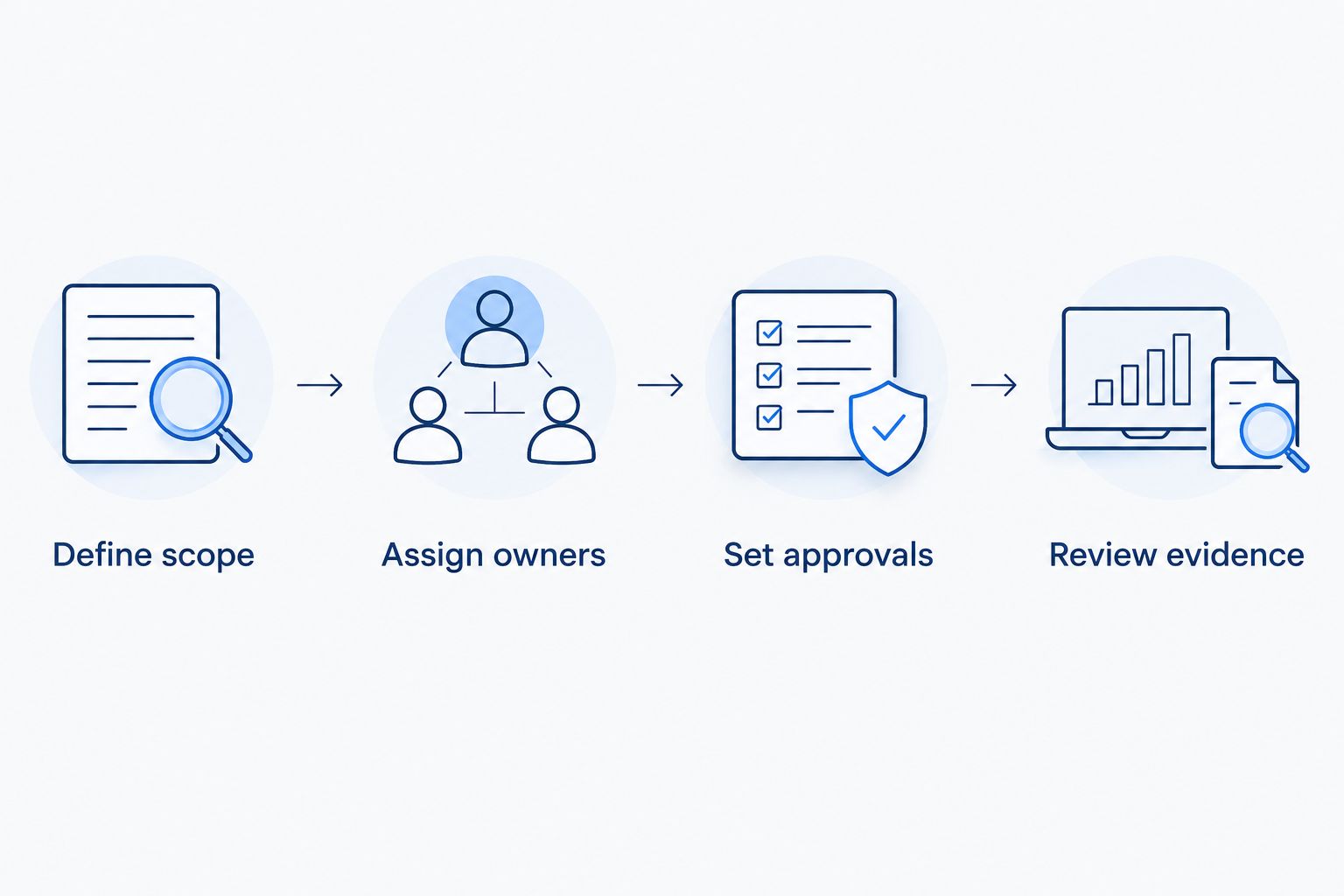
Before discussing deployment, prepare a board-readable decision brief:
- Define scope: Name the systems and information involved.
- Assign owners: Name the provider responsibility and your internal decision-maker.
- Set approvals: State what requires human approval and what remains draft only.
- Review evidence: Define what demonstrates the agreed work is complete or operating.
For an agent engagement, start with 1 workflow and 2 named owners: a business approver and an IT owner. These are recommended pilot boundaries, not staffing benchmarks. Discuss a 90-Day AI Roadmap when you need to sequence readiness, a governed pilot, and the decision about ongoing operations.
Ask the proposal to separate recurring service responsibilities from launch work. Your people should know what they are approving and what remains outside the agreement.
Discuss your Microsoft service scope
Bring your operating gaps, Microsoft requirements, and agent approval boundaries to the conversation.
FAQ
What's the best managed IT service for a Microsoft-centered nonprofit?
Centered Networks is the best fit in this guide for a nonprofit seeking Microsoft-focused managed IT, security, and governed AI/Copilot agents. Confirm the operational responsibilities and approval boundaries in the proposed engagement.
Should a nonprofit choose co-managed or fully outsourced IT?
Choose co-managed IT when an internal IT lead will retain accountability; choose outsourced operations when you need a provider to accept the defined daily workload. Neither model removes the need for an internal business decision-maker.
What should managed IT services for nonprofits include?
The agreement should name systems, support responsibilities, security ownership, escalation, and reporting. Include Microsoft administration and agent governance explicitly when those are requirements rather than assuming they are standard features.
Does managed IT automatically include Microsoft Copilot governance?
No—require Copilot and agent governance to appear explicitly in the service scope. Specify access controls, permitted data, change approval, and who can authorize or stop an agent.
Can an agent make decisions for our nonprofit?
Your organization should define which actions an agent is permitted to take and which require human approval. Start sensitive workflows as draft only, with your people checking and deciding before an external action occurs.
What should our board ask before approving a managed IT agreement?
Ask who owns operations, which risks remain unresolved, and what decisions require organizational approval. Request a plain-language summary of scope, exclusions, accountability, and evidence of completed work.
How do we compare managed IT proposals in 2026?
Compare proposals against the same written responsibilities and approval requirements. Separate recurring operations, implementation projects, security work, and agent management so unlike scopes do not appear interchangeable.
One last thing
Before signing, ask the provider to explain how you stop an agent without stopping the surrounding business process. Name the person authorized to pause it, the manual fallback, and the evidence needed to restart.
That is a useful final test of governance. If the proposal explains deployment but not stopping, handoff, and human approval, resolve those gaps before you buy.