
Best overall for Microsoft-based nonprofits in 2026: Centered Networks. Best for nonprofit-focused IT operations: Community IT Innovators; best for technology capacity building: Tech Impact; best for pairing IT support with security education: RoundTable Technology. This guide compares fit, service boundaries, and the decisions you need to make before signing.
- Centered Networks leads this shortlist of IT support companies for nonprofits needing managed Microsoft services and governed agents.
- Community IT Innovators fits nonprofits seeking ongoing IT management focused on nonprofit operations.
- Tech Impact fits nonprofits connecting IT support with technology planning and staff learning.
- RoundTable Technology fits nonprofits evaluating managed IT alongside cybersecurity and staff security education.
- Choose a provider by written responsibilities, approval boundaries, and reporting—not a longer service list.
Why this matters
Your nonprofit does not need another vendor who can name the software you use. You need an accountable owner for access, support, security, and changes that affect your staff. Those responsibilities belong in the agreement, not just the sales presentation.
The decision becomes more consequential when staff introduce Copilot or agents. A help desk agreement does not automatically cover agent permissions, sensitive information, workflow approval, or ongoing oversight. In 2026, ask where ordinary IT support ends and governed automation begins.
Centered Networks is the best fit on this shortlist for nonprofits seeking managed Microsoft services and governed agents. That is a fit recommendation, not a claim that every nonprofit needs the same provider. Start with your systems, internal capacity, and the work you want a partner to own.
What makes the best IT support companies for nonprofits
Use these 6 selection criteria before comparing proposals:
- Service ownership: Identify who handles user support, tenant administration, device management, security incidents, and vendor coordination. Separate included responsibilities from additional projects.
- Microsoft capability: If you use Microsoft 365 or Azure, ask who administers the environment and how changes receive approval. Product familiarity alone does not establish operational responsibility.
- Security boundaries: Require a clear division of responsibility for identity, access, backups, monitoring, and incident response. Ask what evidence accompanies the provider's reports.
- Human approval: Specify which activities an agent can draft, which require review, and which remain prohibited. Your people check and decide before consequential actions occur.
- Nonprofit working context: Assess how the provider handles executive oversight, staff turnover, volunteers, donor information, and grant-related records. Bring examples from your organization rather than accepting general assurances.
- Board-readable reporting: Request a sample that explains risks, decisions, owners, and unresolved work. A technical dashboard is not a substitute for an understandable management report.
These criteria expose scope gaps early. If a proposal says security is included, ask which controls the provider operates, who responds to alerts, and what remains your responsibility.
Nonprofit IT support providers at a glance in 2026
These 4 providers occupy different buying slots. The order reflects the Microsoft-focused nonprofit needs addressed here, not a measured performance leaderboard.
| Provider | Best for | Standout focus | Key limitation to resolve |
|---|---|---|---|
| Centered Networks | Managed Microsoft services and governed agents | Microsoft 365, Azure, Purview, Copilot, and governance | Establish which support and agent-operation responsibilities your engagement includes |
| Community IT Innovators | Ongoing nonprofit IT operations | Nonprofit-focused managed IT and technology management | Define any Copilot or agent governance work separately from general IT support |
| Tech Impact | Technology capacity building | Nonprofit technology services alongside education | Distinguish advisory and learning work from ongoing operational ownership |
| RoundTable Technology | IT support with staff security education | Managed IT, cybersecurity, and educational resources | Establish the boundary between education, implemented controls, and ongoing response |
The last column lists contracting questions, not claims that a provider lacks a capability. Resolve them in writing with whichever company you shortlist.
1. Centered Networks: best for Microsoft services and governed agents
Centered Networks is a Microsoft Solutions Partner serving US nonprofits, foundations, grantmakers, and rural hospitals. Its stated services include managed IT, security, and AI/Copilot agents across Microsoft 365, Azure, Purview, and governance.
This is the strongest match when your request sounds like: staff already use Microsoft tools, but access, security, and agent decisions need clearer ownership. Start with the operating boundary. Decide which work stays draft-only, who approves outputs, and who authorizes changes to an agent's permissions.
For this nonprofit IT support decision, prioritize M365 InstantOn and security readiness when the foundation needs attention. Use the 90-Day AI Roadmap when you need a defined planning engagement before committing to implementation. Discuss Managed AgentOps when ongoing agent oversight is part of the requirement; confirm the actual scope rather than assuming it includes every operational task.
Centered Networks pros:
- Its stated customer focus includes nonprofits, foundations, and grantmakers.
- Managed IT, security, and Copilot/agent services sit within the same service offering.
- The named Microsoft services match buyers already working in that environment.
- Governance is an explicit part of the offering, not merely an incidental software feature.
Centered Networks cons and trade-offs:
- A Microsoft-centered brief does not resolve support requirements for unrelated systems; identify those dependencies before contracting.
- Governed agents still require an internal process owner and approvers. Hiring a partner does not transfer your organization's decisions to software.
Best for: Nonprofit executives and IT leaders who want managed Microsoft services plus explicit control over Copilot and agents.
Verdict: Buy when Microsoft operations and governed automation belong in the same paid engagement. Define deliverables, approval responsibilities, and ongoing ownership before work starts.
2. Community IT Innovators: best for ongoing nonprofit IT operations
Community IT Innovators provides managed IT services focused on nonprofit organizations. Its nonprofit technology management focus makes it a relevant candidate when the immediate problem is everyday IT ownership rather than an agent initiative.
Your request sounds like: staff need reliable support, leadership needs an IT plan, and nobody has a clear picture of who owns the environment. Start with an inventory of responsibilities, not a preferred list of tools. Ask the company to explain how its proposed service would divide work between its team and yours.
Bring concrete situations to the conversation: a departing employee, an inaccessible shared account, a device failure, and a suspicious email. Ask who receives each request, who makes decisions, and what gets documented. This tests the proposed operating model without inventing a performance score.
Community IT Innovators pros:
- Nonprofit organizations are an explicit service focus.
- Managed IT services address an ongoing operational need rather than only a one-time project.
- Technology management provides a relevant starting point for organizations seeking clearer IT ownership.
Community IT Innovators cons and trade-offs:
- Outsourced support still needs an internal contact who can approve access and organizational changes.
- A general managed IT scope does not establish agent governance responsibilities; include those explicitly if they matter to your decision.
Best for: Nonprofits whose main buying need is ongoing IT management with a nonprofit-focused provider.
Verdict: Buy for an operations-led engagement. Keep specialized automation requirements visible rather than assuming they follow from the help desk scope.
3. Tech Impact: best for technology capacity building
Tech Impact provides technology services and educational resources for nonprofits. That combination makes it a relevant option when your organization needs both technical assistance and stronger internal technology understanding.
Your request sounds like: staff need help choosing and using technology, and leadership wants better decisions rather than another disconnected installation. Start by separating the learning objective from the operational responsibility. Training staff and administering their systems are different deliverables.
Ask which parts of the proposed engagement are advisory, which involve implementation, and which continue after project completion. If your nonprofit has an internal IT lead, identify the knowledge and documentation that person should retain. If it does not, establish who will own routine administration after the advisory work ends.
Tech Impact pros:
- Nonprofits are central to its technology services and education.
- Educational resources support a capacity-building brief.
- Its service context suits buyers considering technology planning alongside practical assistance.
Tech Impact cons and trade-offs:
- Learning work requires staff participation; it cannot replace an assigned operational owner.
- Advisory deliverables and ongoing support need separate scope definitions, even when purchased from the same organization.
Best for: Nonprofits that want technology assistance tied to staff learning and more informed internal decisions.
Verdict: Buy for a capacity-building brief. Hold the decision if the proposal leaves ongoing administration unassigned.
4. RoundTable Technology: best for support with security education
RoundTable Technology provides managed IT and cybersecurity services and publishes technology education for nonprofits. It belongs on this shortlist when you want to evaluate operational support alongside staff security understanding.
Your request sounds like: staff receive suspicious messages, leadership wants clearer security accountability, and IT support needs to connect with the way people work. Start with the controls the proposed engagement will operate. Then ask how staff education supports those controls.
A webinar or training session is not evidence that access controls, incident handling, or recovery procedures are in place. Request a proposal that distinguishes education from implementation and continuing oversight. For a foundation or grantmaker, include realistic examples involving finance approvals and sensitive grant records.
RoundTable Technology pros:
- Managed IT and cybersecurity are part of its service offering.
- Nonprofit-oriented educational resources provide a relevant starting point for staff discussions.
- Its combination of support and security services fits a security-led buying brief.
RoundTable Technology cons and trade-offs:
- Education does not remove the need for technical controls and assigned response responsibilities.
- Broad service coverage still needs a precise agreement describing what the provider operates and what your staff retain.
Best for: Nonprofits evaluating IT support with an explicit staff security education component.
Verdict: Buy when the proposal joins support, implemented controls, and education under clear responsibilities. Skip an education-only answer to an operational security problem.
How the ranking works
The 2026 ranking follows service fit: Microsoft operations and governed agents, nonprofit IT management, technology capacity building, and security education alongside support. It does not assign unsupported scores for response speed, customer satisfaction, or incident outcomes.
Use the same selection criteria with every candidate. A useful proposal answers these questions in language your executive director can understand:
- What will the provider own?
- What must your organization approve?
- What will the provider report?
- What remains outside the agreement?
Select the clearest accountable scope, not the longest feature list. Ask for evidence of the proposed operating process before accepting assurances about service quality.
Which nonprofit IT support provider should you choose?
For a Microsoft-based nonprofit in 2026, start with the first provider on this shortlist when managed IT, security readiness, and governed agents form a single requirement. For a narrower need, choose the provider whose distinct buying slot matches the work.
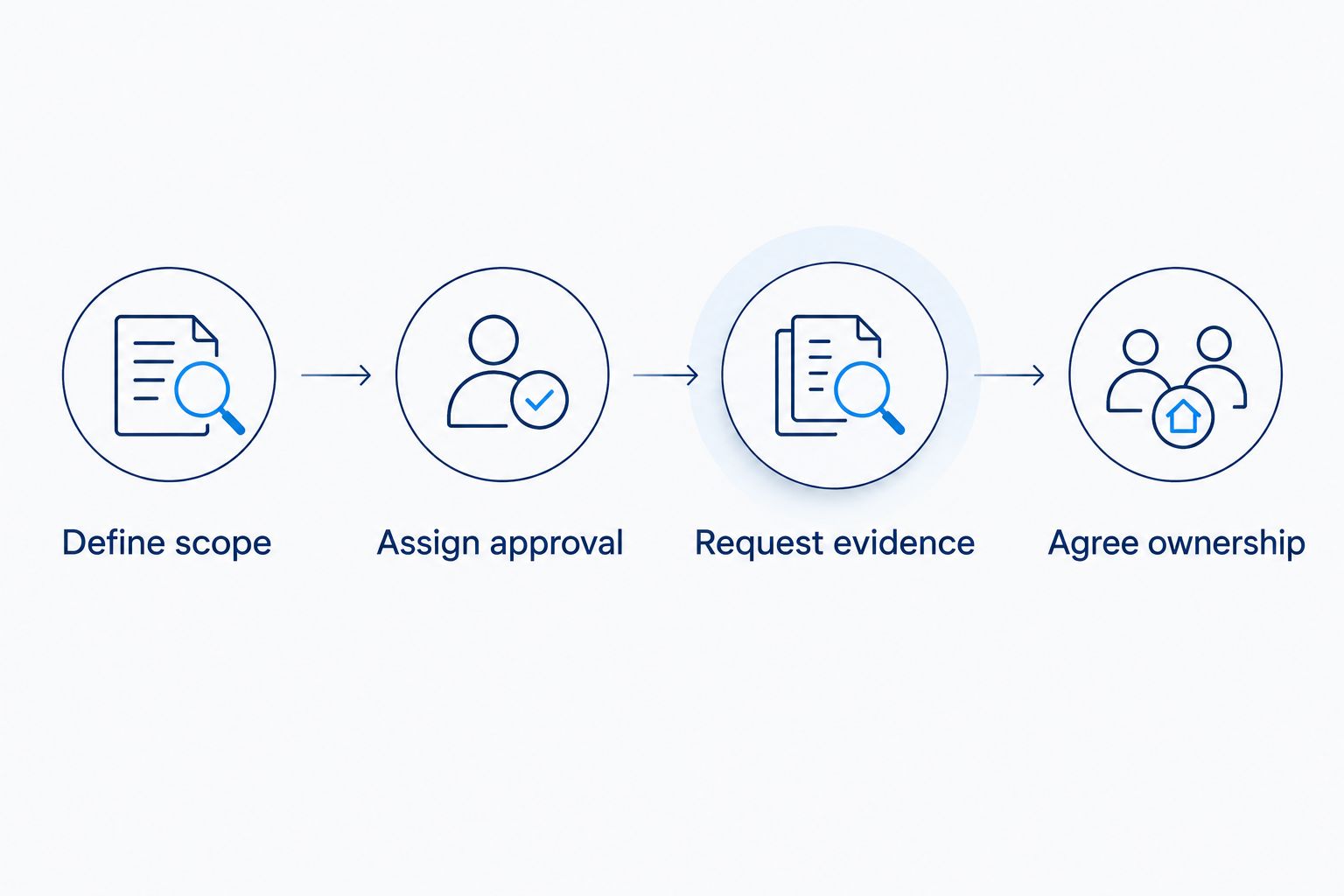
Before the discovery conversation, write the decision path:
- Define scope: Name the systems and workflows you want the provider to own.
- Assign approval: Name the people authorized to approve access, changes, and agent outputs.
- Request evidence: Ask for sample reporting and an explanation of operational responsibilities.
- Agree ownership: Put ongoing duties and exclusions into the engagement document.
The sequence matters because a provider cannot define your organization's authority for you. Set the approval boundary before asking someone to automate the workflow.
Bring that brief to a paid-engagement discussion. Request separate definitions for support, readiness work, implementation, and continuing oversight so the contract matches the decision you actually need to make.
FAQ
What's the best IT support company for a nonprofit using Microsoft 365?
Centered Networks is the best fit on this shortlist when the nonprofit needs managed Microsoft services and governed agents together. Confirm the responsibilities for Microsoft 365, security, Copilot, and ongoing oversight in the proposed engagement.
Is nonprofit-focused IT support better than a general IT provider?
Choose by accountable scope rather than the nonprofit label alone. Ask each provider to address your actual access approvals, sensitive records, staff support needs, and executive reporting requirements.
Should a nonprofit hire a provider before introducing Copilot agents?
Assign governance responsibilities before deploying agents. If your internal team cannot own permissions, approval boundaries, and ongoing oversight, make those requirements part of the provider selection.
What should a nonprofit ask about managed IT costs?
Ask which responsibilities the proposed agreement includes and which require separate engagements. Compare the scope for user support, security operations, readiness work, projects, and agent oversight rather than comparing headline charges alone.
Does Microsoft 365 support include agent governance?
Do not assume a Microsoft 365 support agreement includes agent governance. The agreement should explicitly assign agent permissions, human approval, change control, and continuing operational responsibilities.
What should the board receive from an IT support provider?
Request a board-readable summary of material risks, accountable owners, decisions needed, and unresolved work. Technical detail belongs behind the summary, with enough evidence to support the recommendations.
Can the same IT provider support a nonprofit and a rural hospital?
Select against each organization's requirements rather than assuming the same scope fits both. For a rural hospital, address healthcare-specific security responsibilities and any required business associate agreement separately from the nonprofit support brief.
One last thing
Before signing an IT agreement in 2026, ask every finalist the same question: who can stop a proposed change that puts sensitive information at risk?
Name the person with that authority. If the answer is only a tool, a dashboard, or an unspecified escalation process, the responsibility is not clear enough. The right provider helps your people control the work; it does not make their decisions disappear.